TJ Reader
PDF, Word, Excel & PowerPoint reader, no ads
Contains no adsNo in-app purchasesMade in India
- –reviews
- NewJust released
- 8.0+Android
- 1.1 MBDownload
- v1.0Version
Coming soon to Google Play. Until then, this is the official download.
About this app
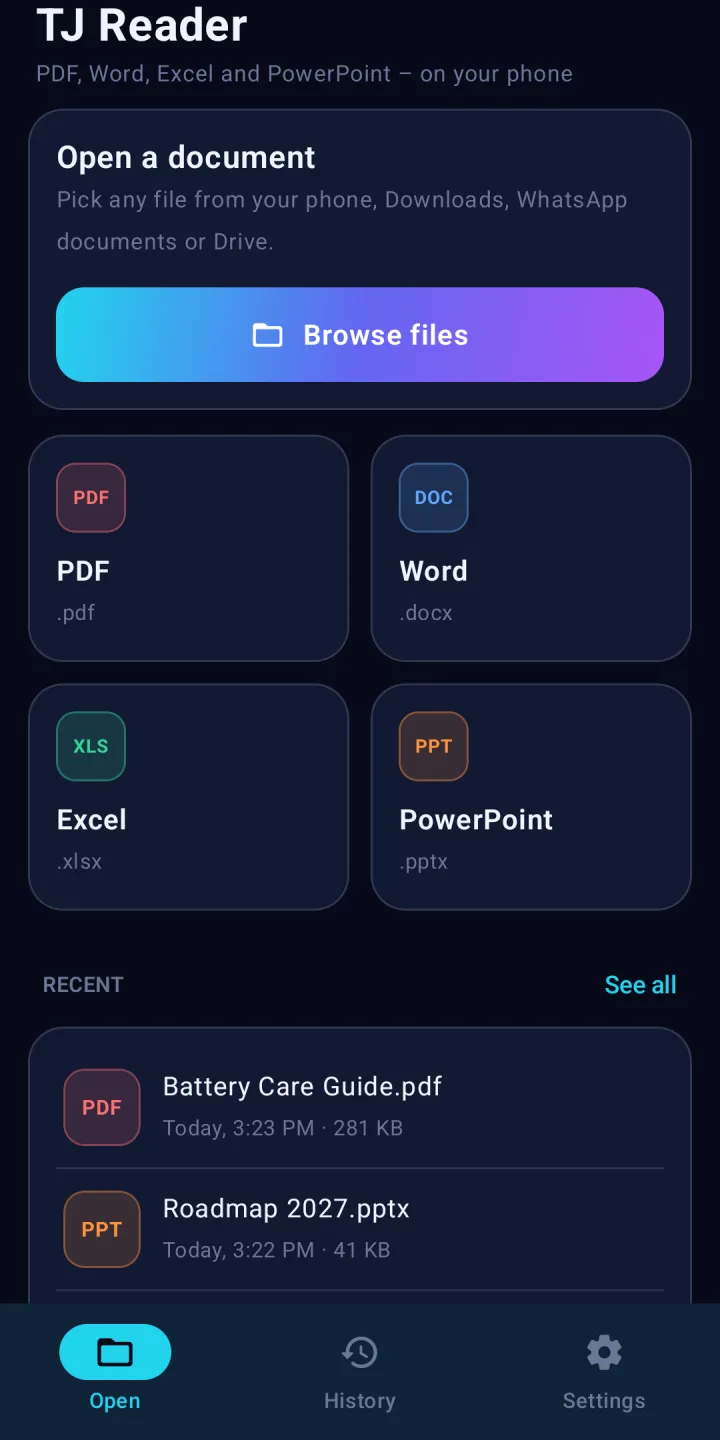
TJ Reader opens PDF, Word, Excel and PowerPoint files on your phone – one small app for every document you receive. Search inside files, read at night, jump to a page, share or print. Documents are never uploaded, and your history stays on your phone.
TJ Reader is a viewer for the documents you get every day – the PDF invoice, the Word letter, the Excel price list and the PowerPoint presentation. Everything is opened on your phone: no account, no ads and no upload to any server. The whole app is just over 1 MB.
PDF, Word, Excel and PowerPoint
Opens .pdf, .docx, .xlsx, .pptx and .ppsx files, plus plain text and CSV. PDF pages are drawn sharp by Android's own PDF engine. Word files keep their headings, lists, tables and pictures. Excel workbooks show every sheet in its own tab, with dates, numbers and percentages formatted as in Excel and frozen row and column headers. PowerPoint slides show text, pictures, shapes, tables and backgrounds.
Read comfortably
Pinch to zoom, jump to any page or slide, and pick up exactly where you stopped last time. Night reading turns pages dark for reading in bed, and you can keep the screen on while you read. Find searches inside Word, Excel and PowerPoint files.
Open files from anywhere
Tap Browse files to pick a document from Downloads, WhatsApp, Drive or any folder – or tap "Open with" or "Share" in another app and choose TJ Reader. TJ Reader needs no storage permission: you choose each file yourself.
History that stays with you
Every document you open is listed in History on your phone, so you can open it again in one tap. Search it, filter by type, star the ones you need, remove one or several, or clear everything – the files themselves are never deleted. Prefer no history? Turn it off.
Share and print
Share a document to WhatsApp, email or any app, open it in another app, or print it and save it as PDF through Android's print service. Sharing is the only way a document leaves TJ Reader.
Private by design
What you open is never sent to us – not the file, not its name, not its contents. The only thing the app sends is an anonymous once-a-day count (a random install number, the app version and the Android version) so we know how many people use TJ Reader – and you can switch even that off.
- Updated on
- Released on
- Version
- 1.0
- Requires Android
- 8.0 and up
- Download size
- 1.1 MB
- Offered by
- TJ Prime
Everything in TJ Reader
Every common document
PDF, Word, Excel and PowerPoint – plus text and CSV files.
Find in documents
Search inside Word, Excel and PowerPoint files.
Spreadsheets that make sense
Sheet tabs, Excel number formats and frozen headers.
Night reading
Dark pages for reading in bed; keep the screen on.
Private history
Reopen in one tap, right where you left off. Only on your phone.
Share and print
Share, open in another app, print or save as PDF.
Safe documents
Documents never run code or load anything from the internet.
Works offline
Everything is opened on the phone – no internet needed.
No ads, no sign-in
No trackers, no account and no storage permission.
What's new
Version 1.0 · 17 Nov 2026
- First release of TJ Reader for Android.
- Opens PDF, Word (.docx), Excel (.xlsx), PowerPoint (.pptx), text and CSV files.
- Find, night reading, go to page, share, print and a private history that remembers where you stopped.
Data safety
Safety starts with understanding how developers collect and share your data. This is what TJ Reader does.
Reviews 0
Every review is anonymous. We never ask for your name, number or email.
No reviews yet. Be the first to tell others what you think.
Questions and answers
Is TJ Reader free?
Yes. TJ Reader is free, with no ads, no sign-up and no in-app purchases.
Does it upload my documents?
No. Every document is opened on your phone and history is kept only on your phone. The only thing sent is an anonymous daily install count, which you can turn off in Settings.
Which files can it open?
PDF, Word (.docx), Excel (.xlsx), PowerPoint (.pptx and .ppsx), text (.txt) and CSV. The older .doc, .xls and .ppt formats and password-protected files are not supported yet – TJ Reader offers to open them in another app.
Can I edit documents?
No. TJ Reader is a viewer: it opens, searches, shares and prints documents but does not change them.
Is TJ Reader on Google Play?
Not yet. TJ Reader will be published on Google Play soon. Until then you can download the official APK safely from this page. Every APK here is signed by TJ Prime; you can check its SHA-256 fingerprint in the install guide.
How do I install the APK?
Tap Download APK, open the downloaded file and allow "Install unknown apps" for your browser when Android asks. Then tap Install. You only need to allow it once.
Which phones can use it?
Any Android phone with Android 8.0 or newer. The download is about 1.1 MB.